Sunday, 29 January 2012

A taste of Ice Cream Sandwich

Its no secret that I am a fan of Android, I like all things android. The open culture, the price, the apps, the ease of building for the system and the ability to mod the software and hardware to my hearts content. No other mobile platform provides any serious hacker with the ability to tinker with the system as much as Android does.

Sure, it has drawbacks too, and at some point in a future article, it would be good to compare the strengths and weaknesses of Android versus other mobile OS's.

Well anyhow, my HTC Desire GSM from mid 2010 was running the leedroid ROM for some time (I chose Leedroid after having experimented with both cyanogenmod and leedroid and decided I prefered the aesthetics of HTC sense). The stock ROM that came with my HTC desire didnt support moving apps to SD card, hence I decided to root the device and put a ROM on there that would allow me to install lots of apps without complaining about space. Leedroid had come to the end of its life, as there had been no update for a few months plus my phone was getting clogged up and needed some spring cleaning. So I thought I'd investigate what the Ice Cream Sandwich buzz was all about.

After a short google search, I found a beta version of ICS for the HTC desire. Stability was not promised, but I figured I would give it a go. Installation was easy as my phone was rooted, all I had to do was put the zip file on my SD card and boot into recovery and install it.

After a short while of playing around with it, I found that the new interface was a very welcome addition. The features that I liked best:
  • Lockscreen - can open up certain apps, like text messaging directly, so it saves a few taps on the screen, if u receive a message and want to check it.
  • Updated Marketplace - The new interface looks very nice, although the pricing for some of the content was disagreeable - classic books for example were pretty expensive, compared to what is available for free on project gutenberg.
  • Notification bar - This was pretty awesome. It lets you control many features of your phone directly, like sounds, music player, data connectivity as well as lets you see the notifications and clear them out with a very innovative slide (shame apple ripped this off completely for iOS5 and are now suing android for tonnes of other patent breaches)
  • Voice - The voice search is vastly improved and well integrated into the OS.
  • Interface lift - The interface was given a much needed uplift (so much that the default ICS interface pars well with HTC sense, my long time favourite look for android) - it has awesome animations, subtle interface tweaks and is so much smoother than before.
  • Settings - This part of the OS recieved a lot of love from the developers, and now includes a data monitoring section (I will be very sorry to see 3G watchdog go from my phone). Battery and memory information has nice graphical data to display usage, which is quite aesthtic.
Ive added a few screenshots of my experimentation below (click to enlarge thumbnails), for the full set of images, visit the album on my google+ account.

Overall, the new interface was much to my liking, the beta version meant that there were a few crashes, especially the camera app - which managed to take 2 pictures before crashing. I dont think this is ready for day to day usage, but its clearly on the way. Id be more than happy to put a more stable version on this and use it for a little longer, before making the jump to a newer handset.

For more details on how to install and run this yourself, use the comments below to direct specific questions at me.

I'll try and get a video of this up and running soon.

Friday, 20 January 2012

CLKF: Splitting files in linux

Command Line Kung Fu: Splitting files in linux

So I have a flash drive thats pretty irrevocably damaged, and for some reason or another it wont format into NTFS, but happily formats into FAT32 (exFAT is an option that I chose to ignore). And I have a 4.4GB file to transfer.

We all know that storing a file larger than 4GB is not possible on a partition formatted in FAT32 (which is a pretty old Microsoft file system type, when no-one actually had files larger than a few megabytes, now superseded by NTFS in an age when video files, Operating System images and games come at several Gigabytes in size, and a Terabyte is becoming the norm for any PC sold); In any case the solution to this problem was to split the large file into several smaller chunks that would fit on the drive or several drives.


There is a whole heap of tools available to this end, both freeware and commercial. A quick search on google reveals that the choices available are numerous. Any compression program (7Zip ftw!) does file splitting too. What I want is a command line tool, that will do the task as minimalistically as possible.

One of the original linux tools created for this purpose was 'tar', which stands for Tape ARchive, which is able to bundle a file or a collection of files into one (or several) file (essentially a precursor for ZIP without compression) ready to be stored on what was the best form of backup medium in those days, magnetic tape.

So using tar on the command line, heres how to split a file up:

$ tar -cvM --tape-length=1024000 --file=OUTPUT_FILE1.tar ORIGINAL_FILE

The --tape-length parameter accepts data in kilobytes, so 1024000 = 1GB. Just keep entering sequential filenames when it asks for another filename for each part it creates.
And to join files back up:


$ tar -xvM --file=INPUT_FILE1.tar ORIGINAL_FILE


So that works, but it isn't the most simplistic solution; there is also the much more simpler, split and cat commands:


$ split -b 1024m debian.iso debiansplit


and then when I had to join the files back:


$ cat debiansplit* > debian.iso


split command (click to enlarge)


Some more awesome Command Line Kung Fu to the rescue!


Wednesday, 18 January 2012

On the Wikipedia Blackout, SOPA, PIPA and Firebug

So this SOPA and PIPA thing is threatening the Freedom of people across the globe and people are making their voices heard. I'm one of the ones that believe that the internet should remain free, and I think its important for awareness of this evil vile act to be propagated. GoDaddy got slated a few weeks back as thousands of customers left and changed domain providers (I didnt change my domains held by them, but im just going to let them expire since I no longer need them), and now Wikipedia is making a stand, great.


However during the course of the day I came to realise how much Wikipedia really means to me. I've never contributed a single article to the site but I use it on a frequent basis. So frequent that I panicked at the loss of Wikipedia for 24 hours.


With a heavy heart and the pain and loss of Wikipedia urging me to do something, I decided to investigate how the blackout was created. Assuming its for 24 hours only, it would make sense for the designers to add some sort of CSS trick to overlay the blackout image over the normal content. So that come tomorrow morning they could remove the said CSS code and have the site return to normal.


I investigated this angle using the good old 'firebug' add-on for firefox. This is an invaluable tool for any person interested in web development or design, and I have been a faithful user since 2007. Lo and behold, the code showed the addition of some 'display: none' css styles for the content and the addition of a new Div element that overlays the entire page with the SOPA message. The solution for quick access? Change the content div style to 'display:block' and the sopaOverlay div to 'display:none'. (Click on images to enlarge)


Although this gave me access to a single wikipedia page, the larger issue at hand regarding SOPA and any similar law's still remains unresolved. Here's hoping that freedom is handed back to the people. Happy CSS Hacking!

Friday, 30 December 2011

Command Line Kung Fu

Recently I had to migrate hard drives, due to a disappointing Samsung Spinfoint F3 hard drive failure (this is the second Samsung F3 1TB hard drive that I've had, thats gone on to meet its maker). This drive wasn't fully dead, and I figured I'd take what I could whilst it was on its last leg. Thanks in part due to Amazons speedy delivery of  a 2TB Seagate Barracuda Eco-Green Sata 3 (6Gb/s) drive.

Now in my opinion, windows copy and paste, just doesn't cut it for copying large files. It may say it has copied the files but I have had MD5 hashes fail before, and given that this hard drive wasn't performing optimally I just didnt want to risk copying and then pasting corrupt data. I usually prefer copying from the command line as I find it a bit more effective.

There are win32 versions of md5 hash checking programs available, but doing singular hash checks sucks when you have multiple files in multiple folders, hidden in multiple depths. I needed a recursive program to check md5 sums for files with certain extensions only... hmmmn.

Batch file with some sort of for loop? Nah, since every windows box I have has a copy of the excellent cygwin program installed, why not go all out and do it the linux way? I mean I have the Bash shell, with a whole load of unix utilies installed on the computer, including md5sum; So ladies and gentlemen, I now produce below, for your perusal, the extravagant single liner I used to alleviate my problems (not all of them, mind you, I still have to claim on my Samsung's warranty, but this command solved one of my many problems):

#find ./ -maxdepth 5 -type f -name "*.iso" -exec md5sum {} \;

This should ideally be piped into some sort of text file for comparision to the source, to ensure that the files were copied exactly bit-for-bit as opposed to a logical copy. Cygwins 'cp' command outdid windows default file copy routines, since all of the md5 hashes checked out. Attached is a screenshot of the sort of output this command produces. (Click to see enlarged version)

Once again, some awesome Command Line Kung Fu saves the day. Happy new year!

I should point out a few things here:

Cygwin is a great tool, built upon greater tools with some excellent  (and ancient) Unix heritage.

Windows 'just works' most of the time, perhaps the file copy errors were hardware faults (i.e. temperature, seek speeds, time of day) - so this is by no means a comprehensive or fair experiment.

I'm aware there is a utility (with a cygwin port) called md5deep, but it wouldn't search recursively for .iso files. Their 'man' page states 'Please note that recursive mode cannot be used to examine all files of a given file extension'.

And finally Samsungs spinpoint drives have recieved some excellent reviews, I was perhaps unlucky with 2 faulty drives (bought at different times), dont let this put you off Samsungs hard drives, they are an awesome company coming up with some awesome products (foreshame on Apple for trying to stall competition in court by some very underhanded techniques against Samsung).

Friday, 9 December 2011

Your Browser Really Does Matter!

Yourbrowsermatters.org fail?
So Microsoft recently launched a new website, yourbrowsermatters.org to make users aware of the need for browser security; This happened some time ago, I just didn't think to publish a blog post about it. But whilst at work today, as part of my organisations state of security, I investigated into the site a little to see how it worked and what it showed.


I have to admit I found the website a little preposterous (a little, really? ha! infact it was very preposterous). First off, the website only rates the most popular web browsers that run on the Windows platform. Visiting  the site in Apples Safari browser gave me an apologetic message indicating that the site didn't support that browser.


However visiting the site on a browser within the Windows platform, gives your current browser a rating out of 4, based on various factors, such as whether the browser prevents phishing attacks, provides a sandboxed environment for your tabs, whether the browser prevents malicious file downloads and finally it covers security issues like whether the browser alleviates cross-site scripting and prevent non-secure content viewing on secure HTTPS pages. 


Opera: small fish
Whilst testing it appears that microsoft doesn't provide ratings for the Opera web browser either, this is most likely due to its small market share and  Microsoft has no reason to pursue Opera's userbase.


The ratings for Mozilla Firefox, Google Chrome and Internet Explorer 9 are shown below:


Firefox: Noob!
Chrome: L00ser!
Mozilla Firefox and Google Chrome both scored a measly 2.5 out of 4, according to Microsoft, and users interested in seeing why can click through the site on various links to compare the browsers results compared. (Edit: This link should take you directly to the page.)


Microsofts own browser Internet Explorer blows the competition out of the water with an amazing 4 out of 4 (pfft...)!


The points it heralds itself with are best avoided with safe browsing and smart thinking, no need for bloated browsers slowing my life down.


I do, remain a little sceptical about microsofts research and reasoning. True, I dont have a research and development department with millions of dollars of funding, but a quick look at wikipedia (not the most reliable, but fairly accurate in this case) and then following the links from there to securityfocus, show Internet Explorer 9 infested with 24 security flaws, Firefox with 2 vulnerabilities and Chrome with none!
Just out of interest Opera had 1 vulnerability, and Safari had an astonishing 0. These statistics are accurate as of today (09/12/2011).


As a sidenote, November 2011 saw Chrome overtake Firefox's userbase for the first time.


It should be clear that the yourbrowsermatters.org site is nothing more than a marketing gimmick devised to conceal the truth from non tech-savy users, as has been the tradition in business practice from the big boys. US users can also get vouchers and various other rewards from microsoft just by downloading and using IE9 (I wont point out how desperate this seems to be coming from the browser that once occupied 80% market share).


I shall bid you farewell, with this closing thought, its just a matter of time before someone uses some Javascript or server side code to exploit any number of these 24 exploits on IE9 (as they have been doing for years) and install some malware or adware on your computer, so I will take my chances with Firefox or Chrome (as I have been doing for years, without any incidents).

Tuesday, 22 November 2011

The Great Trans-Siberian PC Build - part 6

This is part of a series on a computer that I am building. For links to all of the articles in the series, click here.

AMD Phenom II x6 1100T Black Edition

Wednesday, 16 November 2011

The Great Trans-Siberian PC Build - part 5

This is part of a series on a computer that I am building. For links to all of the articles in the series, click here.

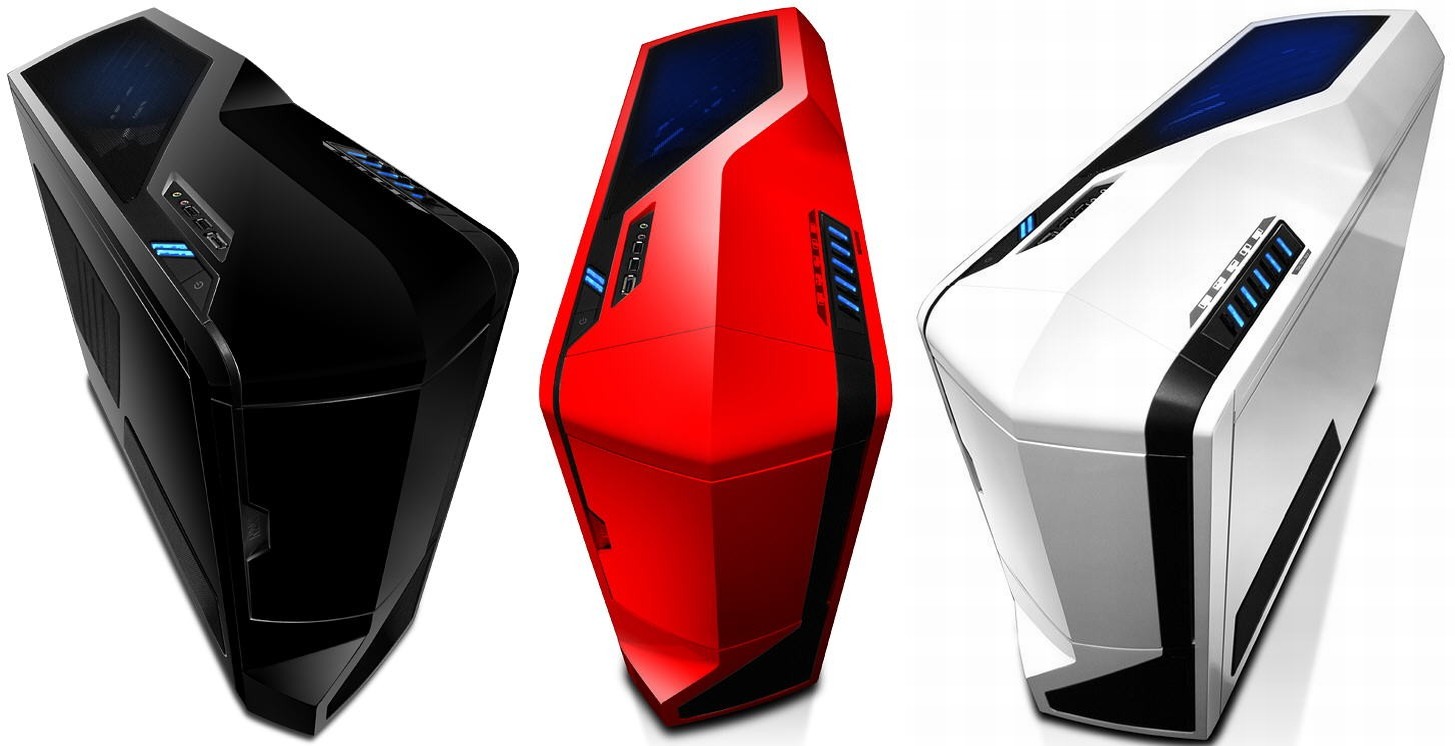
NZXT Phantom (White).

The first thing I noticed when I got home was the particularly large box awaiting in the corner of my living room. Although I failed to measure it with any sort of scientific rigour, off the top of my head, the box easily came to my waist or perhaps even higher.

That by my standards is quite large for a box containing a computer case. Despite the reviews, I failed to take into account the physical measurements of the case. Once unpacked, it is huge!


On the plus side though, the case is very beautifully crafted. It may not be to everyone's liking, but it reminds me of a clone storm trooper from the Star Wars franchise. It is a full tower, made of sturdy steel, and has been designed with the aid of a professional case modder. The size of the case easily lends itself to a computer builder, as it gives plenty of room for maneuverability and placing system components.


Here are some basic specifications:
Type: Full ATX tower
Material: Steel/plastic
Dimensions: 22.2cm depth, 62.3cm high and 54cm wide
Cooling: 7 fans (4 included)
Expansion slots: 7
Drive bays: 5 CD/DVD drive bays, 7 internal bays

The Phantom comes in 3 colours, but other tweaked versions are available online


As per mentioned above, it is a remarkably large case, with plenty of slots for anything and everything you might want to add to it. I cannot see a scenario whereby my computer would need 7 hard drive bays or 5 DVD Rom drives. Perhaps a CD/DVD writer combo and a bluray drive, but 5 drives? 


The 7 expansion slots on the back are a welcome addition though for people looking to do some SLI or crossfire configuration on their graphics cards. The large size and weight of the fully constructed case makes it discordant, if your objectives are to carry it around to LAN parties.


In terms of air-flow the case is brilliant as it comes with 4 fans and has space for 3 more, for a total of 7 fans. 2 large ones (192mm) on the top of the case, 2 small (120mm) at the side, and one on the front, back and bottom each. Once connected very fan also comes with a airflow speed control dial on the top of the case, which lights up in a lovely blue hue. However, I find that the hum of even the 4 default fans are quite loud even on the lowest speed. I cannot fathom what this would sound like with all 7 fans on at the highest setting.This is not a computer to leave running at night processing background tasks if you have trouble sleeping like I do.


The case also has a button on the back to control whether LED lights are enabled or disabled. This is handy at LAN party's when you want to show off your case a bit, or when you need to keep the PC running at night but don't want bright lights to distract your sleep. However, as mentioned before, the large size/weight and loud fans already hinder both of those situations.


The large size of the case lends itself to several nice features such as a very nice cable tidy system and the ability to add plenty of water cooling configurations to the system and lots of additional extra's like SSD's, hard drives and optical drives. Plus there is a large modding community ready to share and review lots of mods to keep the enthusiast happy.


Overall, the design of the case is absolutely stunning and the level of care taken in building the case is a showing of truly masterful craftsmanship. If there was a mid-sized case like this one, it would have been perfect for my needs.

Update: So after purchasing this and building my computer, it turns out that NZXT have just released a new Phantom Case, the Phantom 410 is a mid tower phantom lookalike! Why couldn't they release this 2 months ago? Isnt that always the way?